Showing posts with label Connecting PC to home theater. Show all posts

Wednesday, March 14, 2018

Relief!! (Found surround sound problem)


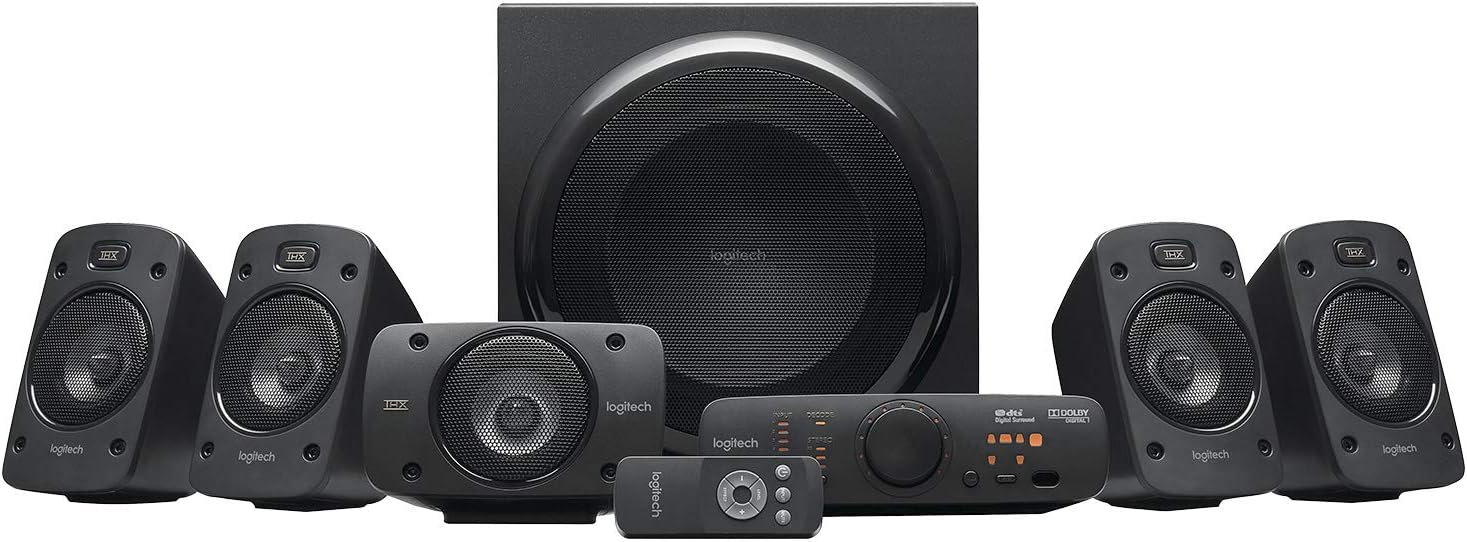
I found out what my sound problem was and it wasn't the pc or sound card!! Thank goodness. If it was the pc and direct X or something, nothing I can do, like the controller issue.  So I thought, ok,  it has to be the cheapy sound card I bought for $30 and I KNOW is made in Taiwan. Either that or the $4oo Logitech sound system (model z906). There is no way it could be the Logitech right? Cuz if it is, I could be screwed if out of warranty. God only knows when Ill ever have $400 again in my life. Guess what? It was the Logitech. Not like I'm that surprised. I have owned 3 Logitech surround systems now and here is what I have learned about gaming with surround sound:

First, Logitech is the ONLY maker of surround sound equipment that you can plug in Analog sound. Digital is on or off. Analog is all the data in between on or off. Digital is a switch and analog is a round volume knob, just think about it that way. So analog and digital dont play nice together. Analog doesnt like a digital cable. You might get analog sound over HDMI (which is digital), but the analog may get cut off as analog supports a LOT more data than digital does. So to get Analog (computer format, PCM its called) to play surround sound, you really have to play it through the 3, 3.5 mm jacks on your sound card. PCs dont tend to have optical outs if you shop around.

So long story short, Logitech sells the ONLY Analog input surround sound devices on the planet. The problem is that they dont last very long. They will usually stop working right around the end of the warranty, usually just outside the warranty. And compared in price to a digital (optical is the name of the port) surround system, Logitech cant compete. There are digital optical home theaters in a box for as little as $50. This is all thats required when gaming on an Xbox. Xbox, though technically a pc and is used primarily for gaming, uses a custom digital optical audio interface. Microsoft also pays a license fee for their sound card to translate Dolby Digital. This is how we have optical out on the Xbox and not 6-Channel direct. Logitech's equipment has the 3, 6-channel direct ports. 3, 3.5 mm cables that each carry 2 channels each, center/sub, front l/r and rear l/r. I found out today that Logitech can be shady though . I LOVE Logitech. Much of what I own is Logitech. I always suggest Logitech to others. I really LOVE Logitech, but today they pissed me off and maybe forever:

I had my current sound system go out with about 2 weeks left on the warranty. So I notify Logitech on THE last day of the warranty. I got it 7/1/2015 and my email got to them on 7/2/2017. I get the standard responses about do this troubleshooting and such. I tried what I had not tried already, from their suggestions, but I had already positively identified the problem and it was 2 ports on the Logitech. 3 ports on the pc would play through only one port on the Logitech. It should be 3 ports pc connect to 3 ports on Logitech, but 2 ports were just dead.

So I get a response quickly (kudos Logitech), the day after the 4th of July, my birthday, the 5th. I want to expedite the process so I call them. Firstly, they disconnected me at least 10 times. The first time i actually got through, they agreed to return the unit, they were typing in the info and finishing the return. I asked what the warranty would be on the new unit. He tells me that it will use the warranty on the first unit. I say, but that ended yesterday, does that mean there is no warranty on the second unit? He says yes. I ask, if the new one fails within 2 years are you telling me I have no re-course? And he tells me yes. I ask to speak to a supervisor and he hangs up on me. After 5 more attempted calls that ended before I could even reach a person, I get the same person back. I ask if I can speak to the supervisor and he says hell go get him, so he puts me on hold and comes back and asks when I notified them of the issue.  He then proceeds to tell me that the computer blocked him from completing my return because the date was the day after it expired. The bottom line was, as long as I didn't ask about the new warranty they were willing to take it back, though they were notified the day after the last day of the warranty. If I complained about the new warranty, they did not want to respect the original warranty at all. I did fill it out Friday night, its not my fault they didn't get the email until the next morning. But regardless of that, a warranty claim received on the day after expiration should not be ignored. I felt like this was very shady behavior on Logitech's behalf. I was hung up on again so I kept calling back. At some point I reached a new tech who said he was willing to return it as it wasn't "like a month" past the warranty. He put me on hold to talk to someone and came back with a "here's what were gonna do" attitude which I felt was also a very, I'm going to do you a favor attitude. I felt that honoring your own 2-year warranty from a legitimate claim shouldn't be a favor to me. He said he got approval to do a one-time return. I didnt mention the warranty on the new unit and he put it through as a warranty return.

So as it stands now, they are to email me a return label I print out and put on the box I load the broken unit into. When they receive my old one they say they will ship a NEW unit. As in NOT refurbished, they assure me. So we will see what transpires but here is the huge lesson I learned that may help you as well:

You dont want to be stuck with an expensive gaming pc where the controllers have suddenly stopped working. And you dont want to be tied to Logitech's expensive but prone to failure equipment and shady service. Play games on an Xbox or PlayStation and you can use a cheap digital surround sound system. Also, check this out: Logitech has 2 versions of their surround sound system. Virtually exactly the same except one has 6-channel direct and a left and right rca port. This is the sound we have been using since there was stereo (left and right) sound. This unit only costs $100 and is mainly for just surround sound on a pc (model z506). The one I have, the z906 has what the other model has but also has 2 digital optical ports and a digital co-ax. So for just 3 extra ports the cost goes to $400!!


Wednesday, July 8, 2015

Connecting PC to home theater - figured out!

Hello Gamers!

So Ive been struggling for years on how to get 5.1 surround sound from my pc to my home theater. As Ive researched this topic, Ive seen many of you with the same questions / problems that I have faced. Ultimately, I had to go with this hardware to get surround sound from pc games:

External USB 5.1/7.1 soundcard:

http://www.vantecusa.com/en/product/view_detail/439

5.1 Home Theater:

http://www.logitech.com/en-us/product/speaker-system-z906

Now, Ill explain the pitfalls in the hopes of helping someone else save some time and research.

First, I learned that the format of sound that comes from most pc video games is analog and is uncompressed. If you think about it, this is the only way sound could come from a game. A movie is linear, that is to say it plays in the track, depending on where in the movie you are. A game is very different. The sound in a pc game is dynamic. That is to say that when I move in the game, the sound has to follow me.

First and foremost you might ask, "why does my XBox and PS play surround sound? Those are pc games too".

And you would be right. However, Sony and MS pay Dolby so they can convert the analog sound to a compressed and digital format (Dolby Digital). Thats what we hear coming from those systems and they play nicely with most home theaters that have an optical input.

Not all cables are created equal!

So we now focus on the cables that can accommodate these analog/digital, compressed/uncompressed signals.

The largest "pipes" to move sound are as follows:

HDMI and analog can carry the most amount of data. (uncompressed analog)

Optical can only handle analog, if its only 2 channels (stereo sound, left and right). We will never squeeze uncompressed 6 channel analog into an optical cable.

Virtually all home theaters have analog inputs, but they are only for stereo sound (left and right RCA jacks). Where most pcs, dont have RCA jacks. Certainly, pcs don't have 5.1 stereo jacks (uncompressed, analog sound from a pc usually uses 3, 3.5mm jacks. These are the familiar but strange orange, black and green 3.5mm jacks on the back of your pc if you have a sound card).

Now keep in mind that HDMI is for digital data. The 3.5mm analog cables are for analog data. So something special is used to transfer analog over HDMI. Usually a receiver or player that can do this conversion. But remember, when we convert from analog to digital, we will lose some data if its compressed.

Now lets talk about bottlenecks. First, don't trust the sound from your tv. Even if you have an optical out on your tv, its most likely only going to output in 2 channel analog and may not even output in 5.1 digital compressed format. Again, tv manufactures don't want to pay Dolby to license that format especially when most tv's only have a left and right speaker.

The other bottleneck I found was the video card. I have a GTX 760 and it has HDMI out on it. So I figured, oh, for sure this card will pump out 5.1 surround, wether Dolby Digital or otherwise. NOPE. It turns out ATI pays Dolby so their cards will send out 5.1 digital compressed. Nvidia however, does not. When you try to configure the nvidia cards HDMI port in Windows settings, it only allows for 2 channel sound.

In researching this problem, an employee from Nvidia stated that Nvidia cards will pump out 5.1 surround sound, but looks for information from the device its plugged into. In this case the tv. However, I experimented by plugging in the video card (GTX 760) into the back of my home theater with HDMI in and out. Guess what. Only 2 channel sound there. The problem with the video card detecting the device its plugged into is that it didn't see that it was plugged into a surround sound receiver, it always thought it was plugged into a tv (and tv's only want to do 2 channel sound). Specifically there is something called an "edid" chip in all devices that give other connecting devices info about that device itself. Would be great if the video card would have found the edid chip in the surround home theater, but it doesn't. Because its ultimately hooked to a tv, the video card will NEVER allow me to configure its HDMI setting for 5.1 surround sound.  So the HDMI port on the video card will not allow for 5.1 anything. The tv wont allow for 5.1 anything. WOW. So whats a gamer to do? Now, there might be someone out there with an ATI card that is connected via HDMI to their home theater and then out to the tv and they might have 5.1 surround sound in games. But even that requires the "analog over HDMI" technology to work. PC Games use analog sound and an HDMI cable is for digital signals.

So, in short to bypass all this mess, which is hard to troubleshoot with equipment that may or may not have the right "tech" to send the 5.1 signal, the easy fix is the equipment Ive outlined above. I used to have a Logitech Z5450, with the 3 3.5mm jacks hooked to the same ports on a Sound Blaster card and the surround sound was wonderful. Now a days, they don't want to include a sound card in new gaming pc's because there is HDMI. Don't be fooled.  So because I had no analog ports on my new gamerig, like my Sound Blaster had, I had to get the hardware above.

Update - The logitech showed up last night. I set it all up and got no surround sound from the sound test in Splinter Cell Blacklist. At this point I cant get surround sound out of my pc no matter what I do.  When I try to configure the Vantec in Windows it shows side speakers but not rear speakers. The rear speaker option is greyed out. At this point I believe its a problem with Windows. If Windows would show the rear speakers in the config screen for the Vantec i think it would work. Ive figured out a lot, but not what i need to get sound working. Ill post back if i figure anything out.

Update: It works!! Windows shows rears speaker as sides in the config screen for 5.1, and if you have a 7.1 setup it shows rears and sides. I found the software for the Vantec in the control panel in Windows. There it was set to 2 channel sound. I was able to successfully configure the Vantec to 6 channels and viola, Splinter Cell Blacklist speaker test was a success. Now all my supported PC games come through in glorious 5.1 surround. Battlefield never sounded so good! Well there you have it folks. The sure fire way to get 5.1 surround sound from your PC games!!